


ANRAN
4.41.45K Reviews
App Specs
- Version
- 6.2.0
- Updated On
- License
- Free
- Downloads
- 500,000+
- Developer
- Shenzhen Anran Security Technology CO.,Ltd
- Categories
- Lifestyle
- Platform
- Android
Screenshots
 Analysis by AppCompare
I judge a home-surveillance app less by how many controls it puts on screen than by whether it helps me answer one useful question quickly: is everything all right at home? That is the main appeal of ANRAN. It is a lifestyle app from Shenzhen Anran Security Technology CO.,Ltd, built around checking camera video remotely. For someone who wants a view of a familiar space while away, that can be more practical than a sprawling smart-home dashboard.
Remote viewing is the core idea
The useful promise here is access to a camera view from a phone when I am not standing nearby. Rather than treating surveillance as a project that needs constant attention, I see the app as a way to make a quick check part of an ordinary routine: look in on an entrance before opening the door to a delivery, or confirm that a room is empty before asking someone to stop by.
That convenience depends on the whole setup, not just the app. A camera needs to be in a sensible position, powered and connected, and the phone needs a working connection when I want to check in. I would test the view from outside the home before relying on it during a trip. A successful view while connected to the same home network is not enough to tell me whether remote access will be convenient when I am away.
Making a quick check genuinely useful
For a useful remote check, I would place a camera where it can show the approach or shared area that matters, rather than aiming it at a blank wall or an unnecessarily private space. Before settling on a position, I would look at the image at different times of day and make sure the view is not dominated by glare, a window, or moving branches. The practical goal is not to watch everything; it is to see enough to make a sensible decision.
I would also decide in advance what I expect to do with an alert. If every movement is treated as urgent, notifications can become background noise, and it is easy to stop paying attention. A useful routine is to check a notification when it arrives, then adjust the camera placement or alert sensitivity if ordinary movement keeps drawing attention. That is a better starting point than expecting any motion alert to explain by itself whether a person or an everyday change caused it.
A realistic day away from home
Imagine I am at work when a delivery is due. A remote camera check can help me see whether someone is at the entrance before I decide to call a neighbor or follow up with the courier. Later, if I receive an alert while out, I can look at the scene rather than having to guess from a notification alone. That is a modest but meaningful benefit: the app can make a check quicker, while the camera’s position and the clarity of the scene still determine what I can actually learn.
This kind of use is different from continuous monitoring. I would not keep the live view open all day or treat a phone screen as a substitute for being present. The strongest fit is occasional, purposeful viewing: check when something prompts a question, then return to what I was doing. If the system produces too many distractions, the habit stops being helpful, so a quiet, well-placed camera can matter as much as the app itself.
Worth Reading Before You Choose

EA SPORTS FC Mobile 26 Is a Bigger Football Game, but It Takes Time

Flipboard Shows What News Apps Must Do Beyond the Feed

Switching to Android Auto Means Rethinking Your Driving Routine

Google Calendar Makes a Crowded Week Easier to Manage

Ludo King Makes the Most of the Minutes Between Plans

Baby Panda World Brings Quick Play to Modern Phones, but Its Game Library Feels Busy
First Impressions and User Interface
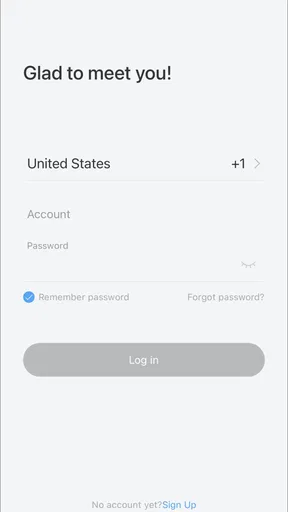
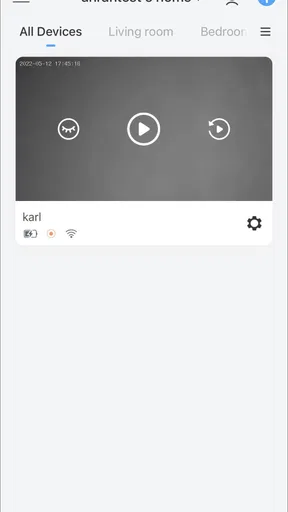
Right off the bat, the app welcomes you with a clean and intuitive interface. I’m all about simplicity when it comes to tech, and the ANRAN app nails it. The home screen is uncluttered, with easy access to all the primary features. You don't need to be a tech wizard to navigate through it, which is always a plus in my book.
What caught my attention first was the straightforward setup process. You just hook up your cameras to the app, and you're good to go. No drama, no fiddling with complicated settings. Just a few taps, and your security network is live.
Features That Shine
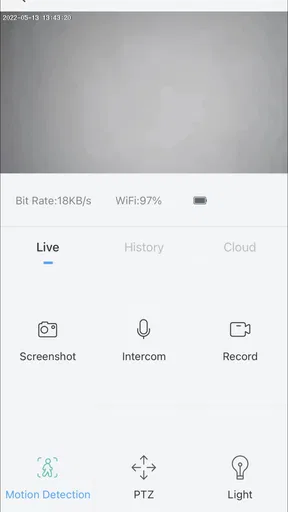
Now, onto the features. One of the standout aspects of the ANRAN app is its real-time video streaming. Picture this: you’re lounging on your couch, and with just a tap, you can see what’s happening outside your front door. The video quality is surprisingly clear, even at night, thanks to the app’s excellent night vision capabilities.
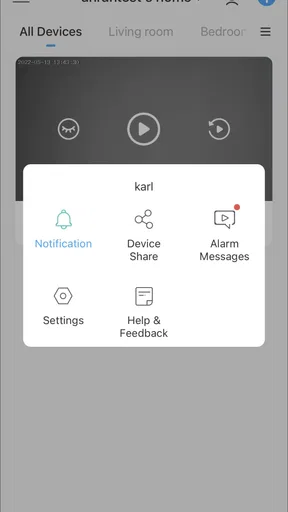
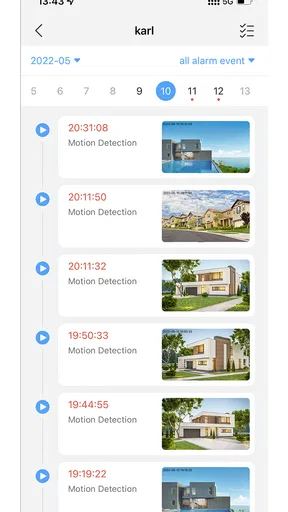
Another feature that I absolutely love is motion detection. The app sends you alerts the moment any movement is detected. It’s like having a personal security guard, minus the uniform. You can even tweak the sensitivity settings to avoid false alarms, which is a godsend if you have pets roaming around.
Choosing the right kind of camera check
Compared with a basic camera app that only helps me view a feed while I am nearby, the value of remote access is being able to check from elsewhere. Compared with a professionally monitored alarm service, though, a phone app is not the same thing: seeing an image is not the same as having someone assess an incident and take action. I would choose ANRAN for convenient personal check-ins, not as a replacement for emergency response or a promise that every event will be handled for me.
There is also a useful distinction between an alert and evidence. A movement notification can tell me that the camera noticed activity; it does not, on its own, establish who was there or why. When something matters, I would open the view and judge the scene rather than making a decision from the alert alone. This small habit helps prevent both unnecessary worry and the opposite mistake of dismissing an alert without looking.
Performance and Reliability
Performance-wise, I’ve had no issues with lag or connectivity drops, which is crucial for a surveillance app. The last thing you want is to miss an important alert because of a glitch. Plus, the app supports multiple camera views. So, if you’re like me and want to keep an eye on different areas simultaneously, ANRAN has you covered.
Another point worth mentioning is the app’s data encryption. Security is a big deal when dealing with surveillance footage, and knowing my data is safe gives me peace of mind.
Small setup choices that prevent frustration
For a household with more than one camera, I would give each view a clear purpose: one for the entrance, another for a shared area, for example. That makes a quick glance more informative than a collection of feeds with no obvious priority. I would also check that the camera shows the area people actually use, not just the nearest patch of floor. These are simple choices, but they can make remote viewing feel like a tool rather than another screen to manage.
Before depending on alerts, I would spend a little time observing what counts as ordinary movement in that location. A pet crossing a room, shifting light, or activity outside the intended area can make an alert less meaningful. Sensitivity adjustment can help, but it is a trade-off: reducing nuisance notifications may also mean that a less noticeable event is less likely to catch my attention. I would aim for a useful balance, then revisit it when the space or household routine changes.
Privacy is part of placement
A camera’s field of view affects more than what I can see; it affects who else may be captured. I would aim it toward the space I have a genuine reason to monitor and avoid pointing it into a neighbor’s home or a private area used by household members. It is worth discussing the placement with anyone who shares the space, too. Remote access is convenient, but a camera should not quietly turn a shared home into a place where people feel watched.
I would treat the phone itself as part of the security setup. A camera view is only private if access to the device and account is handled carefully. I would use the device’s normal screen lock and avoid leaving a live view open where other people can see it. These are not special features; they are practical habits that matter whenever a phone can show footage from home.
Integration and Compatibility
Compatibility can sometimes be a deal-breaker, but not here. The ANRAN app plays well with both Android and iOS devices, and it integrates seamlessly with various smart home systems. Whether you’re using Google Assistant or Amazon Alexa, syncing up is a breeze.
If you're someone who likes to keep everything under one digital roof, this app’s compatibility is a major win. It's like the app knows exactly what users need and delivers it without a hitch.
Who will get the most from it
I think ANRAN makes most sense for someone who already has a compatible camera arrangement and wants a straightforward way to check in from a phone. It can suit a person who lives alone and wants to see the entrance while away, a household coordinating deliveries, or someone who wants to look at a shared room without making a separate trip. The key is wanting occasional visual reassurance, not expecting a camera app to make every security decision automatically.
I would be more cautious if I needed a guaranteed response to an alarm, a detailed system for managing a large property, or a single dashboard for equipment from many unrelated brands. In those cases, a monitored security service or a broader smart-home platform may be a better fit. I would also skip remote video monitoring if I did not have a clear, privacy-conscious place to install a camera or if I knew I would find frequent notifications stressful.
Costs, expectations, and choosing to install
The app is free to download, while optional in-app purchases range from $1.99 to $349.99 per item. That wide span is a reason to look closely at what a purchase offers before paying, rather than assuming every useful part of remote viewing is included at no cost. I would first decide what I need the camera setup to do, then check the app’s purchase screen and make sure any paid option solves that specific need. The price of an app alone does not tell me the full cost of creating a working camera system.
ANRAN has an average rating of 4.6 from around 12,000 ratings, and it has been installed over 500,000 times. It is rated for Everyone, runs on Android 5.0 or later, and version 6.0.0 is the current version. Those details make it easy to judge whether the app is a plausible fit for a device, but they do not remove the need to check camera compatibility and the purchase terms before building a routine around it. The app was released on May 13, 2022, and its developer is Shenzhen Anran Security Technology CO.,Ltd.
Final Thoughts
All in all, the ANRAN app is a solid choice for anyone keen on boosting their home security. It’s packed with features that are not only practical but also user-friendly. Whether you’re tech-savvy or a newbie, this app caters to all levels of expertise.
Sure, no app is perfect, and there’s always room for improvement. But for its price point and functionality, ANRAN is definitely worth checking out. So, if you’re in the market for a reliable surveillance app, you might want to give this one a shot. Trust me, it’s worth the try!
Pros
- User-friendly interface for easy navigation.
- High-quality video streaming with minimal lag.
- Supports multiple devices for flexible use.
- Comprehensive security features included.
- Customizable alerts for specific events.
Cons
- Limited cloud storage options available.
- Initial setup can be slightly complex.
- Occasional connectivity issues reported.
- Subscription required for full features.
- Limited compatibility with older devices.
FAQs for ANRAN
What is ANRAN and what does it offer?
ANRAN is a comprehensive security app designed to work with ANRAN security camera systems. It offers features like live video streaming, motion detection alerts, and cloud storage. Users can monitor their property in real-time, ensuring safety and peace of mind from anywhere using their mobile device.
Is ANRAN compatible with both Android and iOS devices?
Yes, ANRAN is compatible with both Android and iOS devices. It provides a seamless experience across platforms, allowing users to download the app from either the Google Play Store or the Apple App Store, ensuring accessibility regardless of the mobile operating system they use.
Does ANRAN require a subscription for full access?
ANRAN offers both free and subscription-based services. While basic features like live streaming and basic alerts are available for free, premium subscriptions unlock advanced features such as extended cloud storage, enhanced motion detection, and additional camera support, providing a more robust security solution.
How user-friendly is the ANRAN app for beginners?
The ANRAN app is designed with user-friendliness in mind. It features an intuitive interface with easy navigation and setup guides. Even beginners can quickly learn to operate the app and configure their security systems without needing extensive technical knowledge, making it accessible to everyone.
What are the main security features of the ANRAN app?
ANRAN offers various security features, including real-time video streaming, motion detection alerts, and night vision support. It also provides secure cloud storage options, allowing users to save and review footage. These features collectively enhance security and offer peace of mind to users.


